TABB INC. Immunization & Document Management Student User Guide
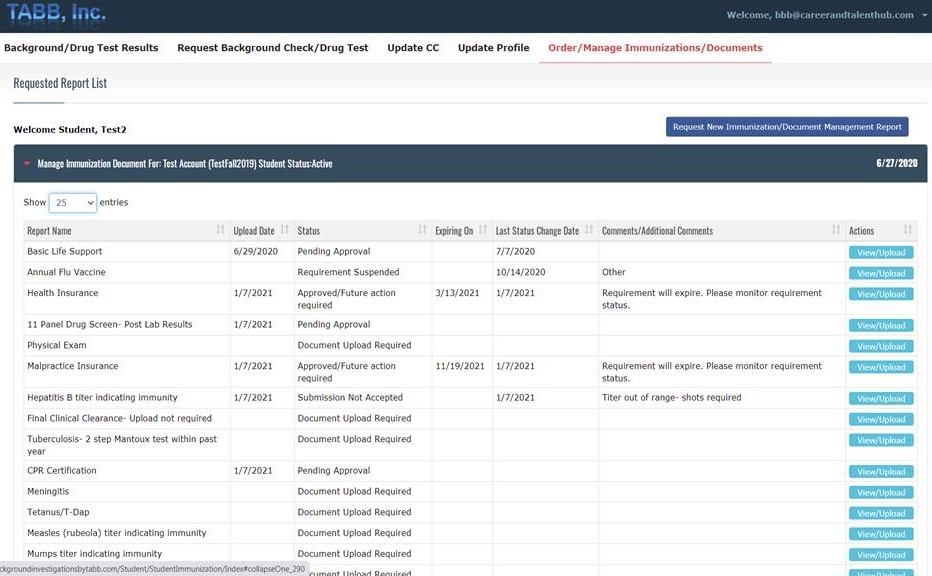
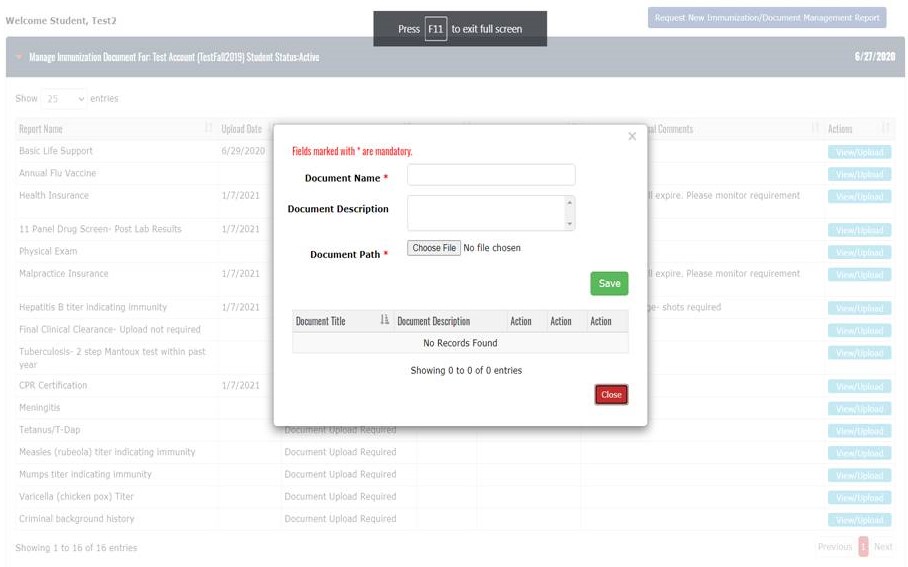
Once logged into your account, clicking the navigational tab, Order/Manage Immunizations/Documents, will allow you to navigate the document management requirements for your program. After clicking, View/Upload, a document management box will appear. You should name the document and include a document description. Information entered by the student in this step will appear in the document manage box in both the college and student account. The status for this document will change from “Document Upload Required” to “Pending Approval”.
Upload Date, Status, Expiring On, Last Status Change Date and Comments/Additional Comments help you manage your program’s requirements. The individual reviewing your submission will “Approve” or mark the status of the upload as “Submission Not Accepted” and will add text to provide additional instructions or comments for your. To uphold the integrity of the process, you cannot delete any document you have uploaded. Only a college administrator or a TABB Student Account manager can delete a document submitted by a student.
You will receive an email every time the status of a requirement changes. If the submission is rejected, the email will include the reason for the rejection. You will receive expiration notices for requirements that expire. The expiration email will include the item that is expiring, the expiration date and notification that further action is required,
Questions? Please contact: Janet Cillo- 908-879-4816; janetcillo@tabb.net